
Chevy Safety Assist on the 2026 Chevrolet Trax — A Confidence Booster for Andalusia, PA Drivers
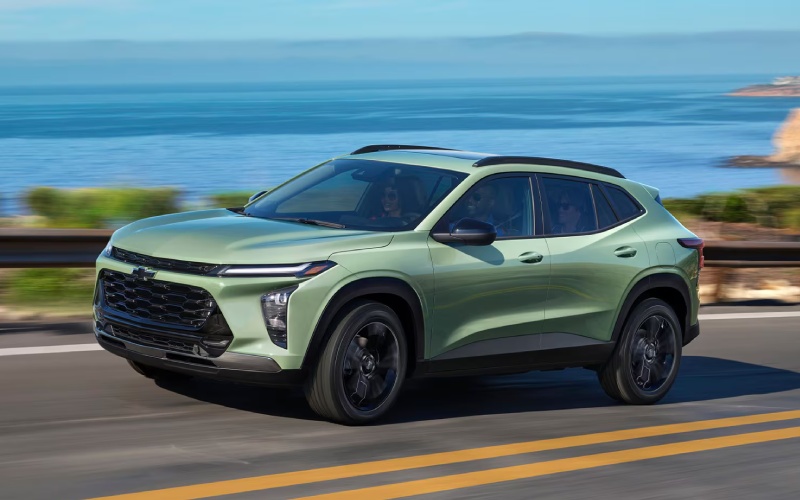
Patriot Chevrolet of Warminster – Chevy Safety Assist on the 2026 Chevrolet Trax — A Confidence Booster for Andalusia, PA Drivers
Safety tech has come a long way, and on the 2026 Chevrolet Trax, Chevy Safety Assist™ helps bring a layer of everyday confidence to the streets you drive most. Around Andalusia, PA, it’s not just about highways; it’s neighborhood intersections, grocery runs, and school pickup lines where quick reactions matter. This suite bundles multiple driver assistance features designed to help you see more, react faster, and keep your attention where it belongs—on the road ahead. If you’re wondering what each feature actually does for your daily driving, let’s break it down in practical terms so you can feel exactly how the Trax supports you behind the wheel.
What Chevy Safety Assist Includes on Trax
Chevy Safety Assist on the 2026 Trax brings together Forward Collision Alert and Automatic Emergency Braking, Front Pedestrian Braking, Lane Keep Assist with Lane Departure Warning, a Following Distance Indicator, and IntelliBeam® High Beam Assist. Each one has a distinct job: monitor closing speeds, identify a pedestrian in your path, nudge the steering if you drift from your lane, help you avoid tailgating, and automatically manage high beams to maximize visibility without dazzling oncoming traffic. The goal isn’t to replace attentive driving—it’s to provide a smart, steady hand at the moments you need it most. In a compact SUV sized right for busy suburbs, these helpers work in the background while the Trax’s responsive steering and composed ride take care of the fundamentals.
How It Feels in Everyday Driving
Imagine you’re easing through a four-way stop as foot traffic crosses the sidewalk. Front Pedestrian Braking is designed to detect a person directly ahead and can provide hard braking at lower speeds if you don’t react quickly. On multi-lane roads where traffic ebbs and flows, Forward Collision Alert warns you if the vehicle ahead is slowing suddenly; if you don’t respond, Automatic Emergency Braking can assist with braking to help mitigate or avoid a collision. When you’re cruising along a familiar stretch and wander near the lane marker, Lane Keep Assist with Lane Departure Warning provides a gentle steering assist you’ll feel in the wheel. It’s subtle, but it helps you recenter without drama. At night, IntelliBeam® automatically toggles between high and low beams when it detects headlamps or taillamps, helping you see more on darker stretches without constantly working the stalk yourself.
Settings You Can Tailor
Drivers appreciate customization, and the Trax obliges with settings that let you take the edge off alerts or tune them to your comfort. You can typically adjust the following distance sensitivity and lane alert intensity, and you can toggle certain features on or off. Set it up once, and the system’s reminders feel like they’re working with you rather than at you. Combine this with standard wireless Apple CarPlay® and Android Auto™ so alerts are accompanied by your preferred navigation, and the cabin stays both calm and connected.
Choosing the Right Trim for Your Safety Priorities
Because Chevy Safety Assist is standard, you don’t have to climb the trim ladder to get foundational confidence. That means you can start with LS or 1RS and still access the core suite. If you’d like a bigger, more immersive view for camera displays and menus, the available 11-inch center HD touch-screen is a worthy upgrade commonly found on higher trims like LT and above. Prefer a sportier vibe? The 2RS adds bold exterior cues and a flat-bottom steering wheel, while ACTIV leans into adventurous styling with Titanium chrome accents and blackout wheels. Regardless of trim, the safety foundation remains consistent—a big win if you’re shopping primarily for driver assistance.
Tips for a Smart Test Drive
Ask your consultant to preview the Driver Information Center so you can see where settings live before you roll out. During the drive, try a safe lane-change scenario on a low-traffic road to feel Lane Keep Assist’s gentle guidance. In a controlled, empty lot, practice gradual following distances to learn the cadence of Forward Collision Alert. After dark, take a short loop to experience IntelliBeam® in action. These simple checks help you understand how the Trax communicates and how you prefer to set it up for daily driving.
Frequently Asked Questions:
Can I turn Chevy Safety Assist features off if I prefer fewer alerts?
Yes. You can typically toggle many features or fine-tune alert sensitivity. We recommend keeping core alerts on, then adjusting sensitivity to your comfort.
Do these systems work in bad weather?
Visibility and weather conditions can affect performance. The driver must always remain attentive and in control, but the features are designed to assist when conditions allow.
Is IntelliBeam® useful on suburban roads?
It is. IntelliBeam® automatically adjusts between high and low beams, which helps on dimly lit stretches while respecting oncoming traffic.
Will Lane Keep Assist steer the vehicle for me?
No. It provides gentle steering assist to help you stay within your lane, but you remain fully responsible for steering and lane control.
Does the big screen improve safety?
The available 11-inch center HD touch-screen doesn’t change the underlying safety suite, but it can make menus, alerts, and camera views easier to read at a glance.
Tech That Complements Safety
The Trax’s technology suite complements driver assistance with helpful connectivity. Standard wireless Apple CarPlay® and Android Auto™ integrate your favorite navigation apps and communication tools. Available wireless charging declutters the console area, and a built-in Wi-Fi hotspot keeps passengers connected for work or school while you focus on the road. Add in Active Noise Cancellation and automatic climate controls on select trims, and the cabin becomes a calm space where safety, comfort, and convenience work together.
Where to Learn and Compare
If you’d like a hands-on walkthrough, one in-person demonstration of Chevy Safety Assist usually explains more than a dozen spec sheets ever could. A product specialist can help you explore feature settings, demonstrate screen layouts, and tailor alert sensitivity so you leave feeling familiar with the system from day one. This is especially helpful if you’re deciding between trims or thinking about adding the available 11-inch display. A single loop around your usual routes can show you how smoothly these features integrate with your driving style.
When you’re ready to take a closer look, Patriot Chevrolet of Warminster can set up a personalized Trax safety and tech consultation that matches how you drive and where you drive, serving Andalusia, Warrington, and Willow Grove. Bring your questions, your must-have list, and a sense of curiosity—the Trax’s blend of right-sized practicality and thoughtful safety tech might be exactly what your everyday routes have been missing.
0 comment(s) so far on Chevy Safety Assist on the 2026 Chevrolet Trax — A Confidence Booster for Andalusia, PA Drivers